InsightsSoftware

Cursor vs. Codex vs. Claude Code (2026)
AI coding assistants are evolving fast. A practical comparison of Cursor, Codex, and Claude Code: where each fits, how they work, and what to consider before choosing for your team.
AI coding assistants stopped being a novelty somewhere around the point where three different products could all claim to “write your code for you” and mean completely different things. One lives inside your IDE. One runs tasks in the cloud while you make coffee. One waits in your terminal like a very patient senior engineer who reads diffs for fun.
By mid-2026, three names keep coming up in serious engineering conversations: Cursor, Codex, and Claude Code. They are not interchangeable. They reflect three different philosophies about where AI should sit in the development workflow, how much autonomy it should have, and what kind of work it is actually good at.
The infographic below compares them side by side. The sections that follow unpack what that comparison means in practice, especially if you are choosing tools for a team rather than experimenting on a side project.
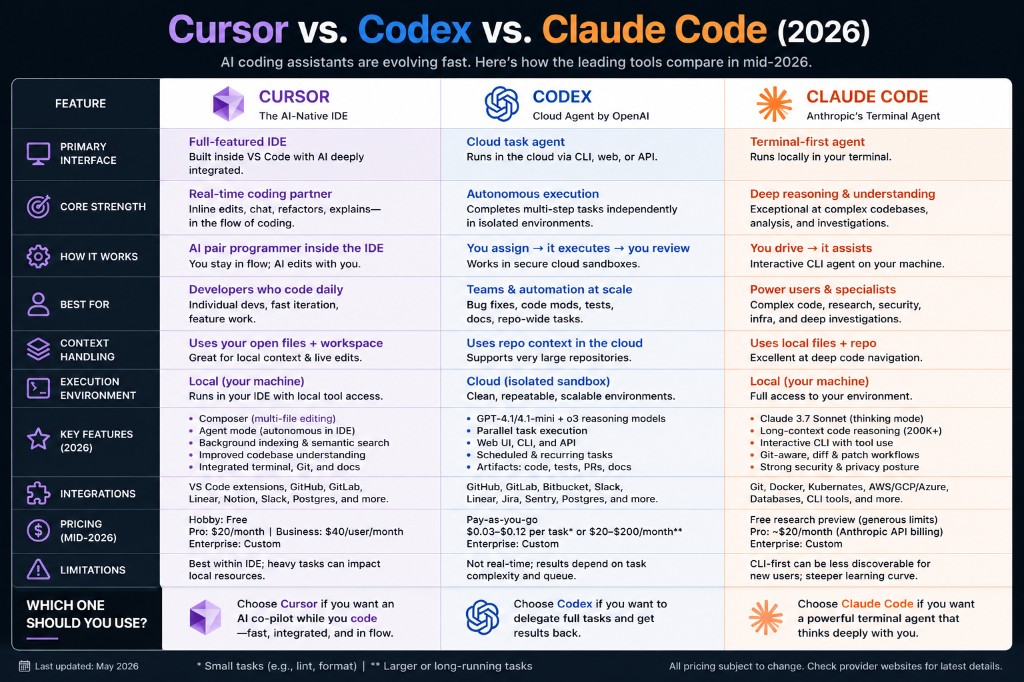
Three tools, three working models
The easiest mistake is treating these products as three flavours of the same thing. They are not. Each one assumes a different relationship between the developer and the AI.
| Tool | Working model | Where it runs |
|---|---|---|
| Cursor | AI pair programmer inside the IDE. You stay in flow; the AI edits with you. | Local machine, inside VS Code |
| Codex | Cloud task agent. You assign work, it executes, you review the result. | Cloud sandbox (isolated environment) |
| Claude Code | Terminal agent you drive interactively. Strong on deep reasoning and investigation. | Local machine, in the terminal |
That distinction matters for teams. Cursor optimises for speed and flow during active development. Codex optimises for delegation and scale. Claude Code optimises for depth, especially when the codebase is complex or the task requires careful reasoning rather than fast edits.
Cursor: the AI-native IDE
Cursor is built around a simple idea: most developers already live in an IDE, so the AI should live there too. It is a full VS Code fork with AI woven into editing, chat, refactoring, and codebase search rather than bolted on as a sidebar afterthought.
Its strength is real-time collaboration. Inline edits, multi-file changes through Composer, Agent mode for autonomous work within the IDE, and semantic search across the workspace all support the same goal: keep the developer coding while the AI handles the repetitive or context-heavy parts.
Cursor works best when someone is actively building features, iterating quickly, or refactoring code they can see and test immediately. It is less suited to handing off a large repo-wide task and walking away, which is where cloud agents start to make more sense.
Typical pricing (mid-2026): Hobby free; Pro around $20/month; Business around $40/user/month; Enterprise custom.
Codex: the cloud agent
OpenAI's Codex takes the opposite approach. Instead of sitting beside you while you type, it runs tasks in isolated cloud environments. You describe the work, it executes in a sandbox, and you review artifacts such as code changes, tests, pull requests, or documentation.
That model suits teams who want automation at scale: bug fixes across a repository, test generation, documentation updates, or recurring maintenance tasks scheduled to run without a developer babysitting the process. Parallel task execution and access through CLI, web, and API make it feel more like infrastructure than a coding companion.
The trade-off is immediacy. Codex is not a real-time pair programmer. Results depend on task complexity, queue time, and how clearly the work was scoped. For some teams that is a fair exchange. For others it feels too asynchronous for day-to-day feature work.
Typical pricing (mid-2026): Pay-as-you-go from roughly $0.03 to $0.12 per small task, or $20 to $200/month for larger recurring workloads; Enterprise custom.
Claude Code: the terminal agent
Claude Code is Anthropic's terminal-first agent, and it targets a different kind of developer workflow. Rather than optimising for inline speed or cloud delegation, it focuses on deep reasoning over code: navigating large repositories, analysing security issues, investigating infrastructure, or working through complex refactors step by step.
Because it runs locally with full access to your environment, it can integrate naturally with Git, Docker, Kubernetes, cloud CLIs, and the other tools power users already rely on. Long-context reasoning and a strong privacy posture make it appealing for sensitive or security-conscious work, even if the CLI-first interface has a steeper learning curve than a polished IDE.
Claude Code is often the choice when the problem is hard to define in a single prompt and benefits from back-and-forth investigation rather than a one-shot task assignment.
Typical pricing (mid-2026): Free research preview with limits; Pro around $20/month via Anthropic API billing; Enterprise custom.
How they compare on the decisions that matter
| Decision | Cursor | Codex | Claude Code |
|---|---|---|---|
| Best for daily feature work | Strong fit | Possible, but async | Good for complex slices |
| Best for repo-wide automation | Limited | Strong fit | Possible with guidance |
| Best for deep investigation | Good in IDE context | Depends on task setup | Strong fit |
| Runs where | Local IDE | Cloud sandbox | Local terminal |
| Team adoption curve | Low (familiar IDE) | Medium (new workflow) | Higher (CLI-first) |
What business and engineering leaders should ask
Tool choice is not only a developer preference question. It affects security boundaries, cost predictability, integration with existing workflows, and how much autonomy AI gets inside your delivery process.
Before standardising on any of these, it is worth asking:
- Does the team need real-time assistance while coding, or delegated tasks with review?
- Should AI run locally with developer credentials, or in an isolated cloud environment?
- What data can leave the machine, and what compliance rules apply?
- Is pricing per seat, per task, or per API usage, and what happens at scale?
- Who owns review, testing, and accountability when AI-generated changes reach production?
The best tool is the one that matches how your team actually works, not the one with the loudest launch demo.
A practical way to choose
You do not need to pick one winner for the entire organisation. Many teams will use more than one pattern depending on the work.
Choose Cursor if...
Developers code daily in an IDE and want AI embedded in that flow. Fast iteration, inline edits, and multi-file refactors matter more than unattended background execution.
Choose Codex if...
You want to delegate whole tasks (fixes, tests, docs, repo maintenance) to a cloud agent and review the output later. Scale and repeatability matter more than sitting beside the AI while it types.
Choose Claude Code if...
You need deep reasoning over complex codebases, security work, infrastructure tasks, or investigative workflows where a terminal agent with strong context handling is more valuable than IDE speed.
Final thought
In mid-2026, AI coding assistants are no longer asking whether they belong in software delivery. The question is which role they should play: co-pilot, delegated agent, or deep reasoning partner.
Cursor, Codex, and Claude Code represent three credible answers. The useful move is not to declare a universal winner, but to match the tool to the workflow, set clear review boundaries, and treat AI as part of your engineering system rather than magic autocomplete with better marketing.
Pricing and feature details in the infographic reflect mid-2026 public information and may change. Verify current plans before making procurement decisions.