InsightsArtificial Intelligence

Inside the AI engine: what actually happens between data and decisions
AI series · Part 2
Artificial Intelligence · Approx. 8 minute read
A practical look at how data, models, outputs, governance, and feedback loops turn AI from a black box into a working business system.
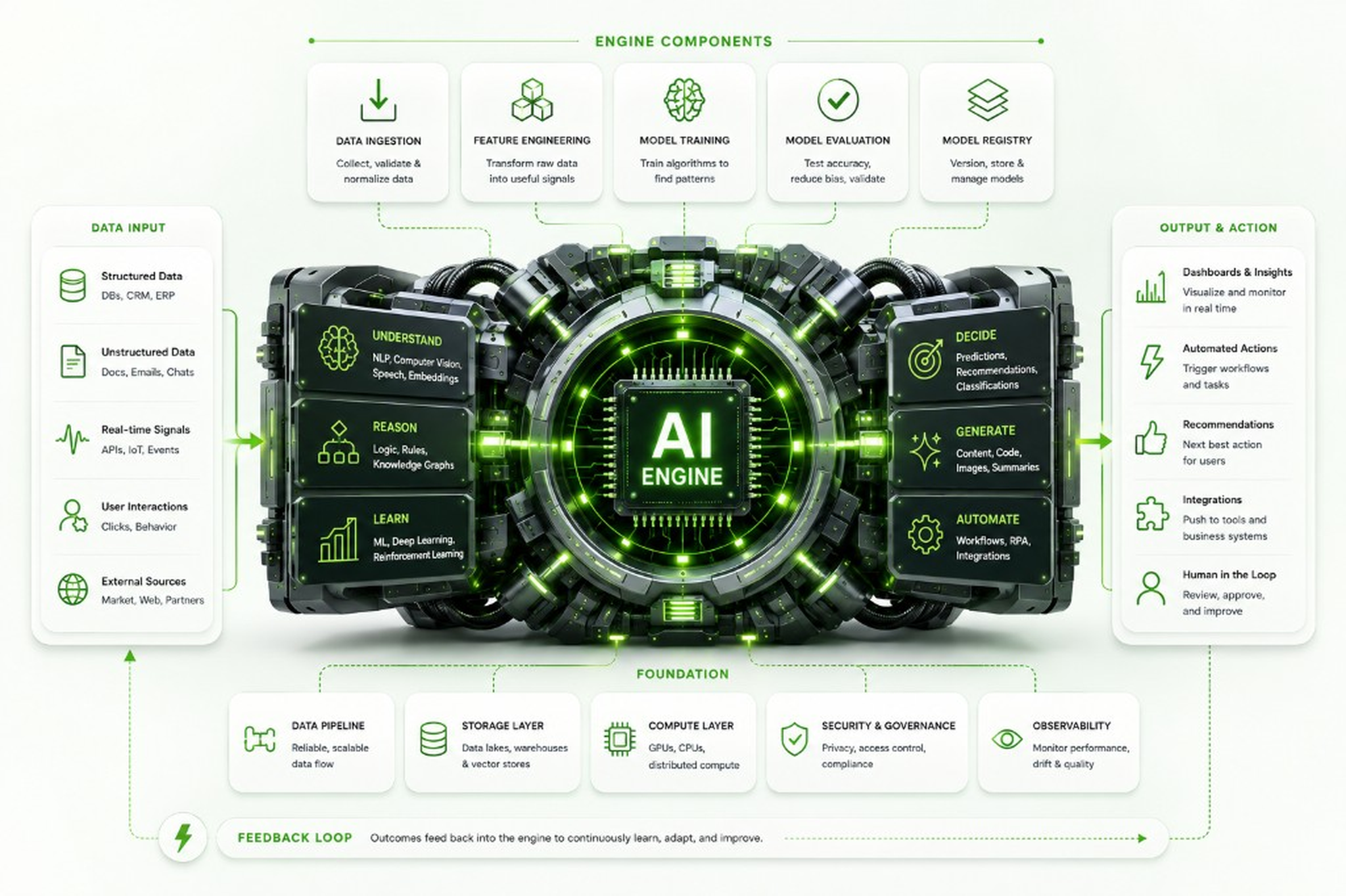
AI can feel like a black box with a marketing department. One minute you put data in, the next minute something intelligent comes out: a prediction, a recommendation, a generated text, a dashboard, or an automated workflow. Useful? Absolutely. Magical? Not quite.
The truth is more practical: an AI engine is a structured system that collects data, prepares it, learns from it, applies logic, produces outputs, and improves over time. Think of it less as a robot brain and more as a well-designed production line for intelligence. Raw information enters on one side, gets processed through multiple technical layers, and comes out as something a business can actually use.
The infographic shows this flow from left to right: Data Input feeds the engine, Engine Components prepare and manage the models, the central AI Engine performs the intelligence work, Output & Action turns that work into business value, and the Foundation keeps everything reliable, secure, and measurable. Let's open the hood.
Data input: the raw material of AI
Every AI system starts with data. Without data, AI has nothing to learn from, compare against, summarise, predict, or automate. The left side of the engine shows the different types of information that can feed an AI system. This is the raw material. Good data gives the engine something useful to work with. Bad data gives it a confident way to be wrong faster.
Structured Data
Structured data is organised information that lives neatly in databases, spreadsheets, CRM systems, ERP platforms, finance tools, or other business applications. It usually follows a clear format: rows, columns, fields, dates, numbers, categories. AI uses structured data for forecasting, classification, reporting, trend detection, and decision support because it is easier to query, compare, and analyse.
Unstructured Data
Unstructured data is information that does not fit neatly into rows and columns. Think emails, documents, PDFs, support tickets, chat messages, contracts, meeting notes, images, and audio transcripts. This is where a lot of business knowledge quietly hides. AI is useful here because it can extract meaning, summarise content, classify documents, detect sentiment, or find patterns that would take humans far too long to process manually.
Real-Time Signals
Real-time signals are live streams of information coming from APIs, monitoring systems, IoT devices, applications, infrastructure, security tools, or user activity. AI uses these signals to detect anomalies, trigger alerts, predict failures, identify risks, or respond to events as they happen. This is especially valuable in security, operations, logistics, and infrastructure management where waiting for a monthly report is not exactly a winning strategy.
User Interactions
User interactions are the traces people leave while using systems: clicks, searches, form submissions, navigation behaviour, purchases, abandoned baskets, support requests, or workflow actions. AI uses this behaviour to personalise experiences, recommend next steps, improve processes, and understand where users get stuck. In business terms: it helps you stop guessing what people do and start learning from what they actually do.
External Sources
External sources are data points that come from outside your organisation, such as market data, public websites, partner systems, supplier feeds, economic indicators, threat intelligence, or industry benchmarks. AI can combine external context with internal business data to improve predictions and recommendations. For example, sales forecasts become more useful when they consider market movement, not just last quarter's spreadsheet optimism.
Engine components: preparing the AI to do useful work
At the top of the infographic, the Engine Components show the technical steps that prepare, train, test, and manage AI models. These parts are easy to overlook, but they determine whether AI becomes a reliable business capability or just another shiny tool that looked impressive in a demo.
Data Ingestion
Data ingestion is the process of collecting data from different sources and bringing it into the AI environment. It is the engine's intake system. Data may come from databases, documents, applications, APIs, cloud platforms, or live event streams. Ingestion makes sure the information arrives in the right place, in a usable format, and at the right time. Without proper ingestion, the AI engine simply cannot consume the information it needs to function.
Feature Engineering
Feature engineering is the process of turning raw data into useful signals that an AI model can understand. A feature is a meaningful input used by the model, such as customer age, purchase frequency, ticket urgency, login location, transaction amount, or document category. This step matters because raw data is often messy, incomplete, or too detailed. Feature engineering helps the model focus on what actually matters instead of drowning in digital soup.
Model Training
Model training is where the AI system learns patterns from data. During training, the model studies examples and adjusts itself so it can make better predictions, classifications, or outputs in the future. For example, a model can learn what suspicious login behaviour looks like, what a high-priority support ticket looks like, or what kind of customer is likely to churn. Training is where AI moves from “empty model” to “useful pattern finder.”
Model Evaluation
Model evaluation checks whether the trained model actually performs well. This includes testing accuracy, reliability, bias, false positives, false negatives, and behaviour on new data. It answers the practical question: “Can we trust this thing enough to use it?” Evaluation is essential because an AI model that works beautifully in a test environment but fails in the real world is not innovation. It is a future incident report.
Model Registry
Model registry is where AI models are stored, versioned, tracked, and managed. It acts like a controlled library for models, showing which version is live, which version was tested, what data it was trained on, and when it was updated. This matters because AI models change over time. A registry helps teams manage those changes responsibly, roll back when needed, and avoid the classic business problem of “nobody knows why the AI changed its mind.”
The AI engine: the intelligence layer
At the heart of the infographic sits the AI Engine. This is where the system applies different forms of intelligence to the data. It does not do just one thing. It can understand, reason, learn, decide, generate, and automate depending on how it is designed and what business problem it is solving.
Understand
Understand refers to the AI's ability to interpret information. This can include natural language processing, computer vision, speech recognition, embeddings, or document analysis. In practice, this means AI can read a support ticket, interpret a contract clause, understand a customer question, analyse an image, or convert messy text into structured meaning. This is the step where raw content becomes context.
Reason
Reason is the engine's ability to apply logic, rules, relationships, and knowledge structures to information. This could involve business rules, knowledge graphs, decision trees, or contextual relationships between data points. Reasoning helps AI move beyond simple pattern matching and support more structured decision-making. It is especially useful when outcomes must follow policy, compliance rules, or business logic. Because “the model felt like it” is not a process.
Learn
Learn is the part of AI that improves from data and feedback. Machine learning, deep learning, and reinforcement learning all sit in this category. The system identifies patterns, adjusts its internal model, and becomes better at handling similar situations over time. Learning is what allows AI to improve predictions, detect new patterns, and adapt when business conditions change.
Decide
Decide is where AI produces a prediction, classification, recommendation, or priority. For example, it may decide whether a transaction looks fraudulent, whether a lead is likely to convert, whether a support ticket is urgent, or which maintenance task should happen first. Decisioning is powerful because it helps teams move faster, but it also needs guardrails. Not every decision should be automated, especially when risk, money, compliance, or people are involved.
Generate
Generate is the part of AI that creates new output. This includes text, summaries, images, code, reports, emails, documentation, or responses to user questions. Generative AI is popular because the output is visible and immediately useful. However, it should still be reviewed, especially in business-critical situations. AI can write quickly. That does not always mean it is right. Very human of it, honestly.
Automate
Automate connects AI output to workflows and actions. Instead of only showing a recommendation, the system can trigger a ticket, update a CRM record, route a request, send a notification, start an approval process, or hand work to another application. This is where AI starts creating operational value. The key is to automate the right things: repetitive, rule-based, measurable work. Not everything needs an AI-powered eject button.
Output & action: where AI becomes business value
The right side of the infographic shows Output & Action. This is where the AI engine stops being an interesting technical system and starts becoming useful to the organisation. Outputs are the decisions, insights, recommendations, and actions that people and systems can actually use.
Dashboards & Insights
Dashboards and insights present AI output in a way people can understand. This might include trends, forecasts, risk scores, anomaly alerts, performance indicators, or operational summaries. The goal is not to create prettier charts for the sake of it. The goal is to give teams better visibility, faster understanding, and fewer “can someone export that to Excel?” moments.
Automated Actions
Automated actions happen when AI output triggers a workflow or task. For example, an AI system might automatically escalate a security alert, assign a support ticket, flag a suspicious transaction, or start a follow-up process. This saves time and reduces manual handovers, but it should be designed carefully. Automation is great when it removes friction. Less great when it creates chaos at scale.
Recommendations
Recommendations are AI-generated suggestions about what should happen next. This could be a next-best sales action, a product recommendation, a maintenance suggestion, a risk mitigation step, or a prioritised list of tasks. Recommendations are useful because they support human decision-making without always replacing it. A good recommendation engine helps people choose faster and better.
Integrations
Integrations connect the AI engine to existing business systems. This could mean updating CRM records, pushing alerts into Teams or Slack, creating tickets in a service desk, sending data to reporting tools, or triggering workflows in enterprise applications. Integrations matter because AI that sits outside the business process becomes another tab people forget to open. Value increases when AI works where the work already happens.
Human in the Loop
Human in the loop means people remain involved in reviewing, approving, correcting, or improving AI decisions. This is especially important for sensitive, expensive, risky, or customer-facing processes. Human oversight keeps AI grounded and accountable. The best systems do not blindly replace people; they support them, speed them up, and let humans handle judgement where judgement actually matters.
Foundation: what keeps the engine reliable
At the bottom of the infographic sits the Foundation. This is the part that does not always get applause, but it decides whether the AI engine can run safely, consistently, and at scale. Without a strong foundation, AI becomes fragile, expensive, risky, or impossible to maintain.
Data Pipeline
Data pipelines move data between systems reliably and consistently. They collect, transform, route, and deliver information to the places where it is needed. In AI, pipelines ensure that models receive fresh, accurate, and properly formatted data. Poor pipelines lead to stale insights, broken predictions, and teams wondering why yesterday's dashboard is making today's decisions.
Storage Layer
The storage layer holds the data the AI system needs. This may include databases, data lakes, data warehouses, document stores, or vector databases used for search and retrieval. Storage matters because AI often needs access to large volumes of information quickly and securely. Good storage design makes the engine faster, more scalable, and easier to govern.
Compute Layer
The compute layer provides the processing power needed to train, run, and scale AI models. This can include CPUs, GPUs, cloud infrastructure, distributed computing, or specialised AI hardware. Some AI workloads are lightweight. Others are computationally hungry little monsters. The compute layer ensures the engine has enough power without turning the cloud bill into a horror story.
Security & Governance
Security and governance protect the AI system, its data, its users, and its decisions. This includes access control, privacy rules, compliance, auditability, data protection, model risk management, and responsible use policies. AI often touches sensitive business information, so governance is not optional. It is the difference between “smart automation” and “legal would like a word.”
Observability
Observability means monitoring how the AI engine performs in the real world. It tracks model accuracy, system performance, data drift, errors, latency, cost, and unexpected behaviour. This matters because AI systems can degrade over time as data, users, markets, or processes change. Observability helps teams spot problems before they become expensive surprises.
Feedback loop: how AI improves over time
At the bottom of the infographic, the Feedback Loop shows outcomes flowing back into the engine. This is how AI improves. The system learns from what happened after a prediction, recommendation, or action. Was the recommendation accepted? Was the prediction correct? Did the automated workflow help? Did users override the result? Feedback turns AI from a one-time implementation into a continuously improving capability.
The feedback loop is also where business reality keeps the AI honest. Because the real question is not “Did the model produce an answer?” The real question is: “Did that answer help the business?” That is where measurement, improvement, and practical value live.
Final takeaway: AI is an engine, not a magic trick
The AI engine works because each part plays a role.
Data input provides the raw material. Engine components prepare and manage the models. The AI engine understands, reasons, learns, decides, generates, and automates. Outputs turn intelligence into action. The foundation keeps everything secure, scalable, and reliable. The feedback loop helps the system improve.
That is the practical view of AI.
Not magic. Not buzzword theatre. Just a carefully designed engine that turns information into better decisions, faster workflows, and measurable outcomes.
Which, frankly, is much more useful than magic. Magic rarely integrates with your CRM.